 80% off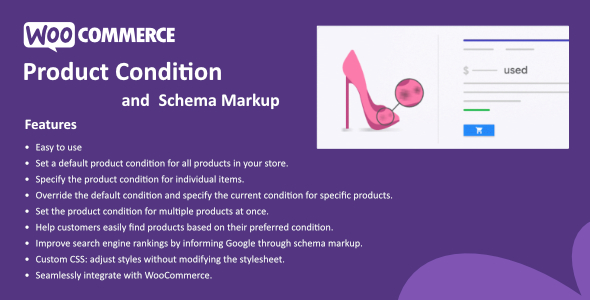
WordPress · Ecommerce/woocommerce/products
Product Condition for WooCommerce – SnoopTool Deal
$9.80
$49
80% off
Price shown is 80% under Envato's own list price. Purchase, download and support all happen on CodeCanyon — nothing is fulfilled by SnoopTool. Not a cracked or pirated copy: "Buy Now" takes you to Envato's own checkout for the same official files and license as buying there directly.
| Category | WordPress — Ecommerce/woocommerce/products |
|---|---|
| Author | hulkplugins |
| Last updated | 24 Sep 2025, 4:34 pm IST |
| First published | 26 Mar 2025, 10:00 pm IST |
About this item
The Product Condition for WooCommerce feature allows you to assign a condition (such as new, used, like new, etc.) to all the products on your site. With this feature, you can set a single default product condition that applies to all products. Additionally, you can specify a unique condition for each individual product, which will override the default setting.
For example, if most of your products are in “new” condition, you would set the default product condition to “new.” However, there may be instances when you have a few products that are in “used” or another condition. In such cases, you can designate the “used” condition for those specific products.
You can get this plugin for as low as $1.6 per month. Download the free version at
Category & tags
Licensing & support
Envato sells this item under its own Regular and Extended commercial licenses, and support (bug fixes, compatibility help) comes directly from hulkplugins through Envato's own support system. SnoopTool doesn't set license terms, collect payment, or provide support — "Buy Now" takes you to CodeCanyon to complete all of that on the real listing.
More by hulkplugins
80% off  80% off
  80% off
  80% off
  80% off
  80% off
  80% off
  80% off
 More in WordPress
 80% off
  80% off
  80% off
  80% off
  80% off
  80% off
  80% off
  80% off
 .png) 80% off
80% off  80% off
  80% off
  80% off