 80% off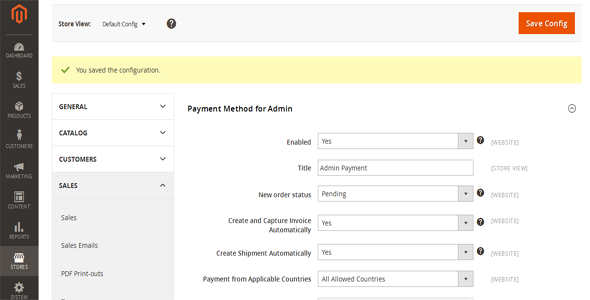
Plugins · Magento Extensions
Magento 2 Admin Payment Method – SnoopTool Deal
$9.80
$49
80% off
Price shown is 80% under Envato's own list price. Purchase, download and support all happen on CodeCanyon — nothing is fulfilled by SnoopTool. Not a cracked or pirated copy: "Buy Now" takes you to Envato's own checkout for the same official files and license as buying there directly.
| Category | Plugins — Magento Extensions |
|---|---|
| Author | duytrinhit |
| Last updated | 10 May 2016, 9:42 am IST |
| First published | 10 May 2016, 9:42 am IST |
About this item
In some cases, the administrator of Magento website need to create the order in the backend that under Sales -> Orders -> Create New Order, but this process requires a payment method to be accessible. Admin Payment Method is a solution in this situation by giving a universal payment method which can be only used in the backend for creating any order when other payment methods cannot afford.
How It Works
Simply install and configure the extension. Go to Store -> Configuration -> Sales -> Payment Method: Payment Method for Admin to configure the options. After enabling the payment method you can select it on the “Create New Order” screen.
Features List:
- Compatible on all Magento 2 versions 2.1.x, 2.2.x
- Support to choose
Category & tags
Licensing & support
Envato sells this item under its own Regular and Extended commercial licenses, and support (bug fixes, compatibility help) comes directly from duytrinhit through Envato's own support system. SnoopTool doesn't set license terms, collect payment, or provide support — "Buy Now" takes you to CodeCanyon to complete all of that on the real listing.
More by duytrinhit
80% off  80% off
  80% off
  80% off
  80% off
  80% off
  80% off
  80% off
 More in Plugins
 80% off
  80% off
  80% off
  80% off
  80% off
  80% off
  80% off
  80% off
  80% off
  80% off
  80% off
  80% off