 80% off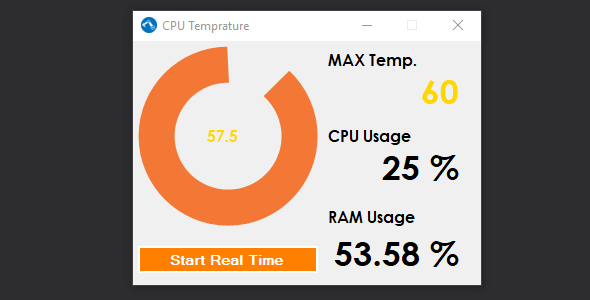
.NET · Miscellaneous
System Info – SnoopTool Deal
$1.80
$9
80% off
Price shown is 80% under Envato's own list price. Purchase, download and support all happen on CodeCanyon — nothing is fulfilled by SnoopTool. Not a cracked or pirated copy: "Buy Now" takes you to Envato's own checkout for the same official files and license as buying there directly.
| Category | .NET — Miscellaneous |
|---|---|
| Author | sagarmaher |
| Last updated | 27 Mar 2018, 12:43 pm IST |
| First published | 27 Mar 2018, 12:43 pm IST |
About this item
System Information Software
Description :-
System Info software was develop to monitor the temperature of system at real time using .NET Framework and system default features. in Visual Studio 2012.
Prerequisites :-
.NET Framework 4.5
Visual Studio 2012 +
Windows os
Running The System Info Code (Installation)
Download the System Info.zip
Extract Zip file.
Start Visual Studio 2012 or Greater Version of Visual Studio as Administrator.
Access project file using visual studio : File->Open->Project/Solution
Open project by using System Info.sln
Run the project.
Key Features
Displays Processor Temperature
Display the amount of RAM has been utilized
CPU usage
Real time info
Development Environment
This System info software was
Category & tags
Licensing & support
Envato sells this item under its own Regular and Extended commercial licenses, and support (bug fixes, compatibility help) comes directly from sagarmaher through Envato's own support system. SnoopTool doesn't set license terms, collect payment, or provide support — "Buy Now" takes you to CodeCanyon to complete all of that on the real listing.
More by sagarmaher
80% off  80% off
  80% off
  80% off
  80% off
  80% off
  80% off
  80% off
 More in .NET
 80% off
  80% off
  80% off
  80% off
  80% off
  80% off
  80% off
  80% off
  80% off
  80% off
  80% off
  80% off